

When Logitech released the original Superlight, it set a benchmark for lightweight competitive esports gear. The release of the logitech g pro x superlight 2 builds upon that established shape while introducing internal updates designed to solve long-standing user complaints. By replacing mechanical microswitches with hybrid optical-mechanical units, upgrading to USB-C charging, and boosting the underlying sensor tracking capabilities, Logitech aims to keep its flagship competitive mouse relevant in an increasingly crowded market.
This review breaks down the exact technical changes, real-world tracking precision, click feel, battery longevity, and practical handling to determine if this upgrade justifies its spot on your desktop.
What Changed from the Original Superlight?
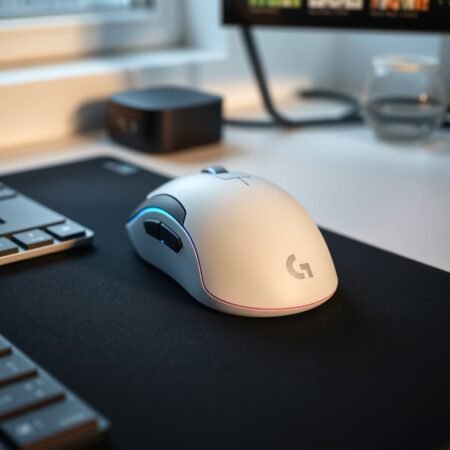
At first glance, the logitech g pro x superlight 2 retains the exact symmetrical shell geometry of its predecessor. Gamers familiar with the medium, universal shape will feel right at home. The outer shell, button placements, and side grip profiles remain identical, ensuring muscle memory carries over seamlessly.
However, under the hood, the internal hardware has received a complete overhaul:
- Switches: Upgraded from traditional Omron mechanical switches to custom LIGHTFORCE hybrid optical-mechanical switches.
- Port Standard: Transitioned from micro-USB to native USB-C.
- Sensor: Upgraded from the HERO 25K to the HERO 2 sensor, offering higher tracking speeds, DPI limits, and sub-micron accuracy.
- Polling Rate: Native support extended beyond 1,000 Hz up to higher report frequencies via firmware updates.
- Weight: Reduced slightly from 63 grams to 60 grams while maintaining structural integrity without structural perforations.
Key Hardware Upgrades and Technical Specifications
LIGHTFORCE Hybrid Switches: Tactile Feel and Reliability
The most significant physical change in the logitech g pro x superlight 2 is the switch mechanism. Mechanical microswitches in competitive gear historically suffered from double-clicking issues over extended usage due to contact wear and electrical signal degradation.
LIGHTFORCE switches combine optical actuation with a mechanical tactile clicker. When you press a main button, an optical beam is broken instantly, registering the input at light speed without needing a debounce delay. Simultaneously, a mechanical leaf spring delivers a crisp, tactile snap to your finger.
The tactile feedback is noticeably stiffer and louder than the original model. Gamers who prefer lighter, spammability-focused buttons might find the initial actuation force slightly firm, but the feedback eliminates accidental clicks and ensures long-term switch durability.
HERO 2 Sensor, Tracking Accuracy, and Polling Rates
The upgraded HERO 2 sensor delivers top-tier performance metrics. It supports up to 32,000 DPI, over 500 IPS (inches per second) tracking speed, and up to 50G acceleration. Beyond high peak numbers, the HERO 2 introduces independent X and Y axis DPI adjustments and precise sensor lift-off distance calibration.
Combined with updated firmware, the mouse supports high reporting frequencies. Raising the polling rate from 1,000 Hz to 2,000 Hz or 4,000 Hz reduces input latency on high-refresh-rate monitors (240Hz and above). Tracking remains smooth across fast arm swipes and micro-adjustments without stuttering, smoothing, or unwanted angle snapping.
USB-C Connectivity, Battery Life, and Build Quality
Replacing the outdated micro-USB port with standard USB-C is a long-overdue quality-of-life upgrade. The port is deeply recessed to secure the included flexible charging cable during wired play.
Despite the reduced weight of 60 grams and higher sensor polling capabilities, battery management remains exceptional. At a standard 1,000 Hz polling rate, the internal battery lasts up to 95 hours of continuous motion. Running higher polling rates decreases overall battery run time, but full recharges complete quickly via standard USB connections.
The outer shell retains its solid matte finish, available in black, white, and magenta options. The chassis exhibits zero flex when squeezed along the sides, and internal rattling is entirely absent.
Real-World In-Game Performance and Handling
In competitive tactical shooters like Valorant and Counter-Strike 2, as well as fast arena titles like Apex Legends, the logitech g pro x superlight 2 performs with total reliability. The mouse weight distribution is balanced dead-center, making flick shots and tracking movements feel natural.
The zero-additive PTFE feet installed on the base provide a consistent glide across cloth and hybrid mousepads. While some enthusiast players may still prefer aftermarket pure PTFE or glass skates, the stock glide surface is significantly smoother out of the box than earlier production runs of the original Superlight.
The firm tactile response of the LIGHTFORCE switches prevents accidental actuations when resting heavy fingers on primary buttons. Side buttons remain tactile with minimal pre-travel, though they retain a slightly softer bottom-out feel compared to the primary switches.
Logitech G HUB: Calibration and Sensor Adjustments
To manage settings on the mouse, users utilize Logitech G HUB. The software suite has evolved to give competitive players deeper control over sensor mechanics:
- Lift-Off Distance (LOD): Choose between low, medium, or high profiles to ensure tracking cuts off immediately when repositioning your mouse.
- Axis Tuning: Separately adjust horizontal and vertical sensitivity to match specific screen aspect ratios or game engine quirks.
- Hybrid Switch Modes: Toggle the main switches between pure optical mode for maximum power saving or hybrid mode for optimized response.
- On-Board Memory: Save custom profiles directly to the hardware controller to run your preferred DPI and keybindings on tournament PCs without keeping background software active.
For technical research into peripheral latency and sensor testing methodologies, hardware standards managed by organizations like IEEE and empirical testing sites like RTINGS highlight how high polling rates reduce latency variance across modern high-refresh displays.
Superlight 1 vs Superlight 2 Comparison
Who Should Buy the Superlight 2?
The decision to buy the logitech g pro x superlight 2 largely comes down to your current setup:
- Buy it if: You are upgrading from older, heavier gaming mice, need optical switch reliability to eliminate double-clicking, want USB-C convenience, or play on high-refresh monitors where high polling rates improve feel.
- Pass or Wait if: You already own an original Superlight in perfect working condition, prefer ultra-light split-click designs under 45 grams, or prefer very light switch actuations for rapid spammed clicks.

Other Articles

What Happens If Occupational Health Find You Unfit for Work?
Practical & Unique Gift Ideas for a 30th Birthday Male




No Comment! Be the first one.